One visual language
Decide whether forms are rounded or sharp, surfaces are clean or worn, and proportions are realistic or exaggerated.
The room kit is one piece of the final scene. Repeat its measured parts, then add the prop, material, and character you make in later lessons.
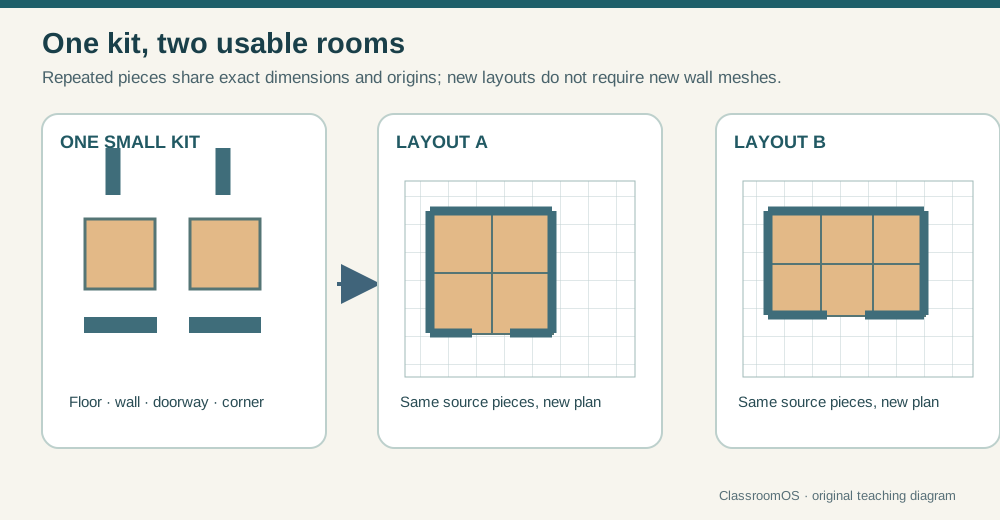
Start with the editable technique workshop above. Reuse your model in the next lesson. The production workflow below extends the browser exercise and helps you test work made in your chosen app.
Grades 8–12 · Six studio lessons · Any 3D app + any engine
Create a small, consistent game environment from the surface of a wall to the motion of its character. Each lesson ships a real asset, and every asset survives the most important test: working inside the engine.
0 of 6 lessons complete
Studio challenge
Pick a clear art direction: cozy spaceship cabin, abandoned research lab, stylized bedroom, fantasy workshop, or another teacher-approved idea. Reuse the same palette, proportions, and level of detail across every lesson.
Decide whether forms are rounded or sharp, surfaces are clean or worn, and proportions are realistic or exaggerated.
Save source files separately from exported files. Test the exported GLB, not only the scene in your 3D app.
asset-studio/source for your app's own files (.blend, .ma, .max, .skp, .kra, .psd…), asset-studio/textures for images, asset-studio/exports for .glb files, and asset-studio/reference for source records. Use your own work or verified CC0/public-domain textures, HDRIs, skyboxes, and models—never generated or ambiguously licensed assets.Studio brief · set once, used in every lesson
Real art teams agree on these numbers before anyone models. Fill them in now; every lesson shows the ones it needs, so your texture, prop, room, and character all belong to the same world.
Bring your own software
These lessons teach the craft, not one program. Model in Blender, Maya, 3ds Max, SketchUp, Tinkercad, Blockbench or Nomad; paint in Krita, GIMP, Photoshop, Photopea, Procreate or Aseprite; rig with Mixamo or by hand. Whatever you use, and whatever you learn next, the work moves through the same three stations:
.glb or .png into Godot, Unity, Unreal, Roblox Studio or Three.js. It can also go back into your app.| File | Usually comes from | What survives the trip |
|---|---|---|
.glb / .gltf best | Blender, 3ds Max, Tinkercad, Blockbench, Nomad, Spline | Mesh, UVs, PBR materials and textures, rig, named animation clips. Always metres, Y up. |
.fbx | Maya, 3ds Max, Mixamo, older pipelines | Mesh, UVs, rig and animation; materials use older shading. Often in centimetres. |
.obj (+ .mtl) | Almost every 3D app | Mesh, UVs and simple materials. No rig or animation. |
.dae / .usdz | SketchUp, older apps / Apple and iPad apps | Mesh, materials, sometimes animation. |
.stl / .3mf / .ply | CAD (Fusion, Onshape), Tinkercad, slicers, 3D scanners | Shape only (3MF and PLY can add colour). No UVs. Usually millimetres, Z up. |
.png | Any paint or photo app | Pixels and transparency. Layers flatten, so keep your .kra/.xcf/.psd. |
Each lesson also has its own Bench tuned to that lesson's checks. Exports you download are kept on a shelf in this browser, so the next lesson can open them again.
Production sequence
Assessment
| Dimension | Beginning | Production-ready |
|---|---|---|
| Readability | Purpose is unclear at game distance | Silhouette and material communicate purpose quickly |
| Construction | Scale, shading, pivots, or deformation break | Transforms, normals, topology, and weights behave predictably |
| Efficiency | Detail is expensive or inconsistent | Geometry and texture resolution support visible impact |
| Pipeline | Works only in the source scene | Named, exported, reimported, and tested in an engine |