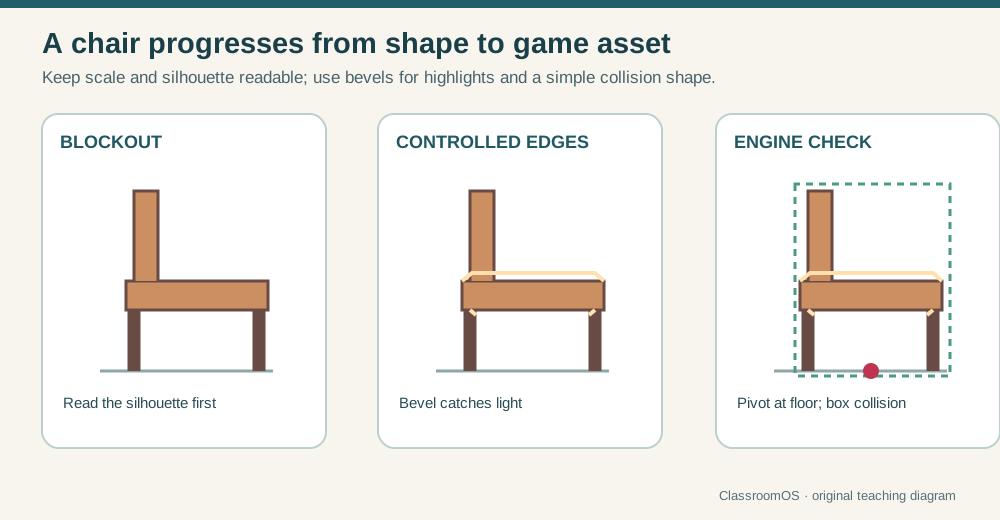
Edges catch light
Use a small, consistent bevel. Two or three segments are often enough for a game prop.
Keep the same silhouette through blockout, edge treatment, and engine validation.
Start with the editable technique workshop above. Reuse your model in the next lesson. The production workflow below extends the browser exercise and helps you test work made in your chosen app.
Lesson 02 · 70 minutes · Prop modeling
Build a chair, desk, side table, shelf, or stool from measured forms. Spend geometry on silhouette and shading, not on details the player will never see.
Reference and scale
| Player reads | What function and mood should the prop communicate from several meters away? |
|---|---|
| Dimensions | Record width × depth × height in meters from a real example. |
| Camera | Will players inspect it closely, see it in the background, or both? |
| Reuse | Which parts can be mirrored, instanced, or reused on another prop? |
| Budget | Set a classroom target such as 500–3,000 triangles, then justify exceptions. |
.glb export converts both, so one metre in your app becomes one metre in any engine. Keep the object near the world origin.Large forms first
Realtime furniture workshop
Choose a brief, assemble the prop from low-poly parts, and tune its proportions and surface. Drag the viewport to orbit, scroll to zoom, and use the inspector to texture the whole asset.
Build slot empty. Add the mission parts, set believable dimensions, then run the engine check.
Shading without waste
Use a small, consistent bevel. Two or three segments are often enough for a game prop.
Shade Auto Smooth or use appropriate normals so flat panels remain flat while bevels appear rounded.
Keep edges that change silhouette, support shading, define UV seams, or enable deformation.
Add one or two functional details: joinery, drawer gap, cushion seam, handle, or fastener.
Engine behavior
A static chair can use an origin centered on the floor footprint. A door needs its origin on the hinge. A drawer needs it centered along the slide. Name the mesh for another human: SM_Chair_Studio_A, not Cube.017.
Game-ready check
SM_FurnitureName_A.glbAlso submit your source file (.blend, .ma, .skp…), the Bench check report, triangle count, dimensions, and one engine screenshot.Any 3D app → Bench → any engine
Model in the app you like (Blender, Maya, 3ds Max, SketchUp, Tinkercad, Blockbench, Nomad, Fusion), export a .glb, .fbx or .obj, and drop it here with its texture files. The Bench measures it against a 1.75 m person and your brief, then offers one-click fixes for the usual export accidents: wrong units, floating origin, unapplied scale, default names, missing UVs. Download the cleaned .glb, or open it back in your app.
Where is export (and re-import) in your app? Pick your apps below; your choice is remembered across lessons.
Free, fast, and professional apps
The quickest entry for low-poly, voxel-like, or stylized furniture. Cuboid modeling, automatic UV templates, texture painting, and browser access keep the first prop small and finishable.
Open Blockbench ↗Best free all-rounder for measured hard-surface modeling, modifiers, bevels, normals, UVs, baking, collision meshes, and direct glTF export.
Open Blender’s official site ↗A browser-first 3D editor with templates and realtime presentation. Useful for rapidly blocking a stylized furniture concept; confirm the export path before making it the source of a game asset.
Compare Spline plans ↗A production hard-surface and environment modeler used for game props, visualization, and large scenes. Strong modifier, scripting, and plugin workflows suit studios producing many related assets.
Explore 3ds Max ↗Tinkercad is another free option for very first blockouts. Use Blender or 3ds Max when clean shading, UV control, reusable modifiers, and engine-ready topology matter.
Definition of done
0/4 checked
Your room now has a measured, engine-tested hero prop.