5–10 min · Play
Open the lab, play the current build, name what changed since last lesson.
Grades 6–12 · 10 lessons · one complete 2D game
Build Pixel Courier, a pixel-art platformer, from the first pixel to a packaged game. The sprite you draw in lesson 01 is the hero you tune, animate and ship in lessons 02–10: every lab shares your art.
0 of 10 lessons complete
Click the game, then ← → to run and Space to jump. Your own art appears here as you work through the lessons.
Four acts, one game
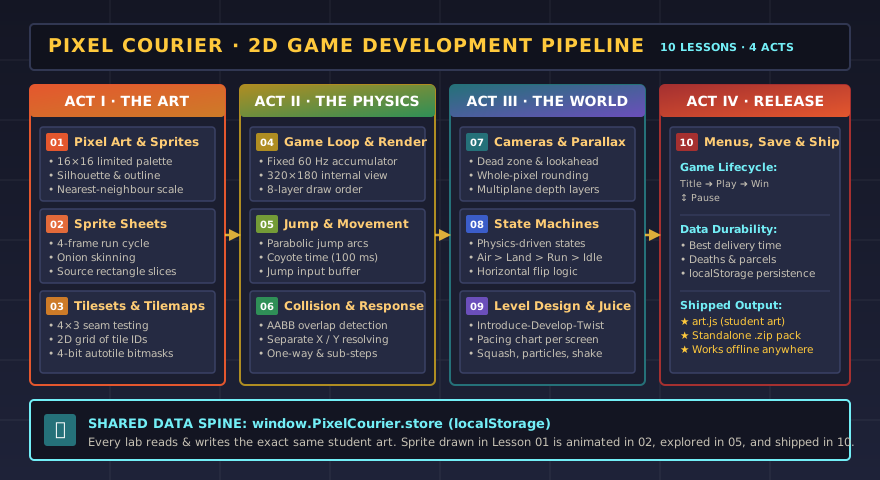
Act I · Make the art
01Pixel Art & SpritesDraw a 16 × 16 courier with a limited palette; test silhouette and scaling.YOUR HERO02Sprite Sheets & AnimationAnimate idle, run, jump and fall with onion skin; export a sprite sheet.RUN CYCLE03Tilesets & TilemapsPaint seamless tiles, build a text tilemap, and learn autotile bitmasks.YOUR WORLDAct II · Make it move
04Game Loop & RenderingCompare per-frame, delta-time and fixed-step updates; order draw layers.STEADY LOOP05Movement & Jump FeelTune acceleration, gravity and jump arcs; add coyote time and jump buffers.JUMP FEEL06Collision & ResponseStep through AABB collision, fix snagging and tunnelling, add one-way planks.SOLID FLOORSAct III · Make it a world
07Cameras, Layers & ParallaxDead zones, smoothing, look-ahead, clamping, pixel snapping and parallax.CAMERA08Animation State MachinesDrive animations from physics with a state machine; break it on purpose.LIVING SPRITE09Level Design & Game FeelDesign introduce–develop–twist levels, chart pacing, add juice, playtest.TEACHING LEVELAct IV · Ship it
10Menus, Saving & ShippingTitle, pause and win states, save data, credits, and the starter pack.SHIPPED GAMETheory map
The nine Tiny-Loop tutorials on What Makes a Game? each lean on a few of these ideas. Use this table to jump from a game you liked to the theory behind it.
| Tiny-Loop tutorial | Era on the history timeline | Theory in this pathway |
|---|---|---|
| ⭐ Catch | 1972–1979 Arcade | 01 Pixel Art & Sprites · 06 Collision & Response · 09 Level Design & Game Feel |
| 🖱️ Clicker | 2009–2015 Phones & indies | 04 Game Loop & Rendering · 09 Level Design & Game Feel · 10 Menus, Saving & Shipping |
| 🧩 Maze | 1980s Sprites & tiles | 03 Tilesets & Tilemaps · 06 Collision & Response |
| 🐦 Flappy | 2009–2015 Phones & indies | 05 Movement & Jump Feel · 07 Cameras, Layers & Parallax · 02 Sprite Sheets & Animation |
| 🏓 Pong | 1972–1979 Arcade | 04 Game Loop & Rendering · 06 Collision & Response |
| 🫧 Shooter | 1972–1979 Arcade | 02 Sprite Sheets & Animation · 06 Collision & Response · 09 Level Design & Game Feel |
| 🎵 Rhythm | 1990s Bigger worlds | 04 Game Loop & Rendering · 09 Level Design & Game Feel |
| ❓ Quiz Quest | 2000s Anyone can publish | 08 Animation State Machines · 10 Menus, Saving & Shipping |
| 📖 Story | 1972–1979 Text adventures | 08 Animation State Machines · 09 Level Design & Game Feel |
Suggested pacing
Open the lab, play the current build, name what changed since last lesson.
Read the history card and the short code together. Predict before touching sliders.
Students draw, tune or paint in the lab. Everything saves to the shared art store.
Definition-of-done checks need a demonstration or explanation, not just ticks.