Lesson 06 · 60 minutes · Physics layer
Detect the overlap, then undo it.
Collision has two halves: detection (do two rectangles overlap?) and response (where should the player end up?). You will step through an AABB collision a half-frame at a time and break it on purpose with tunnelling.
Where this comes from
Rectangles have powered collisions since Pong.
Pong’s ball bounced when its rectangle overlapped a paddle’s rectangle; Space Invaders checked whether a shot’s rectangle touched an invader. Axis-aligned rectangles are still the first tool every 2D engine reaches for, because the overlap test is four comparisons.
function overlaps(a, b) {
  return a.x < b.x + b.w && a.x + a.w > b.x &&
         a.y < b.y + b.h && a.y + a.h > b.y;
}
The courier’s hitbox is 10 × 14 inside a 16 × 16 drawing. Spikes use an even smaller box. Hitboxes slightly smaller than the art make near-misses feel fair — the Shooter tutorial does the same with bullets.
Collision stepper
Watch one frame in slow motion.
Each frame has two halves. Move: put the box where its velocity says (red dashed outline). Resolve: if it is inside a solid tile, push it out and zero the velocity on that axis.
Step through collisionsTry every scenario with both methods
- Sliding over tile seams with “both at once”: the box overlaps the next floor tile by a sliver horizontally and vertically, the smaller push is sideways, and the courier snags on a flat floor.
- Very fast fall with no sub-steps: the box moves 26 px in one step and lands entirely below a 16 px floor — it never overlapped, so nothing stopped it. That is tunnelling.
The fix
Move one axis at a time, in small steps.
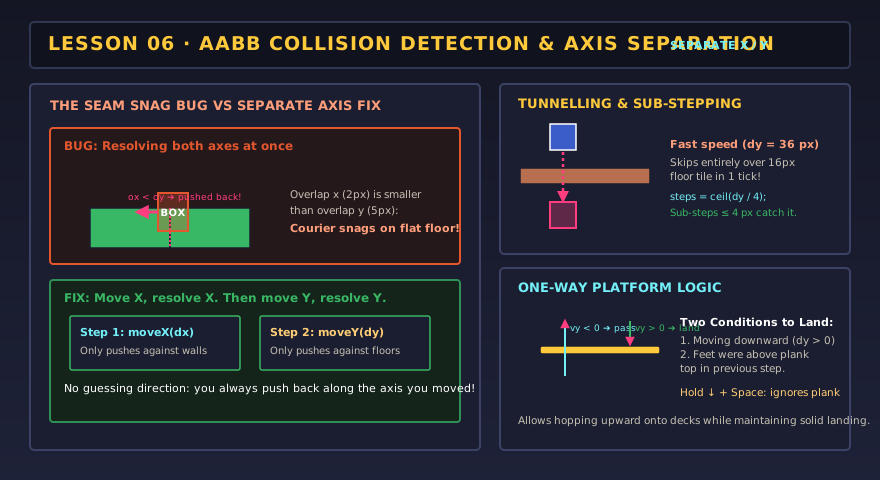
function moveX(dx) {
  p.x += dx;
  for (const t of solidTilesTouching(p)) {
    p.x = dx > 0 ? t.left - p.w : t.right;   // push back out the way we came
    p.vx = 0;
  }
}
function moveY(dy) {
  p.y += dy; p.onFloor = false;
  for (const t of solidTilesTouching(p)) {
    if (dy > 0) { p.y = t.top - p.h; p.onFloor = true; } else p.y = t.bottom;
    p.vy = 0;
  }
}
const steps = Math.ceil(Math.max(Math.abs(dx), Math.abs(dy)) / 4); // ≤ 4 px each
for (let i = 0; i < steps; i++) { moveX(dx / steps); moveY(dy / steps); }dy > 0) and the feet were above the plank’s top last step. Rising through it, or dropping with ↓ + jump, passes straight through.In the real game
Turn the debug view on and play.
Hitboxes in Pixel CourierBlue = solid · yellow = one-way · pink = hazard / player
Definition of done
Your collisions are solid when…
0/4 checked
Evidence: Screenshot the debug view and annotate the player hitbox, a solid tile, a one-way plank and a hazard box.
Lesson 06 complete?
Your art and settings are already saved for the next lesson.