Lesson 05 · 65 minutes · Control layer
Make the jump feel fair.
Players judge a platformer in the first three seconds. You will tune acceleration, gravity and jump speed with live sliders, then add the invisible helpers great platformers rely on: coyote time, jump buffering and variable jump height.
Where this comes from
Good controls quietly forgive the player.
Modern pixel-art platformers such as Celeste are known for being precise yet forgiving: you can still jump a few frames after running off a ledge, and a jump pressed just before landing still counts. Players rarely notice these helpers — they just feel that the game is fair.
The Flappy tutorial uses the simplest version of this physics: one impulse up, constant gravity down. Here you add running and the forgiveness tricks.
Movement lab
Tune the courier with real numbers.
- Play with the starter values.Click the game, run right, jump the first gap.
- Try each preset.Tight, Floaty, Ice. Describe each with one adjective.
- Turn coyote time off.Run off a ledge and press jump late. Then turn it back on.
- Tap vs hold jump.With variable height on, a tap gives a hop, a hold gives a full jump.
Courier physicsThe pink line traces your feet
Theory: velocity, acceleration, arcs
Move toward a target speed; let gravity bend the path.
const dir = (keys.right ? 1 : 0) - (keys.left ? 1 : 0);
const rate = dir ? accel : decel;                 // speed up vs brake
vx = approach(vx, dir * maxRun, rate * dt);       // never snaps — it ramps

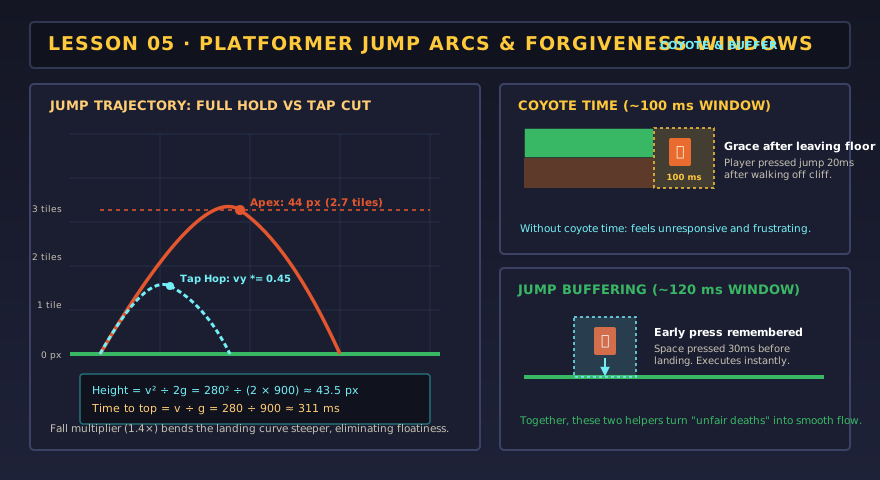
coyote = onFloor ? COYOTE : coyote - dt;          // grace after leaving a ledge
buffer = jumpPressed ? BUFFER : buffer - dt;      // grace before landing
if (buffer > 0 && coyote > 0) { vy = -jumpVel; buffer = coyote = 0; }

if (!jumpHeld && vy < 0) vy *= jumpCut;           // let go early → shorter hop
vy += gravity * (vy > 0 ? fallMul : 1) * dt;      // fall faster than you rise
A jump is a parabola. Its height depends on the launch speed and gravity: height = v² ÷ 2g. With v = 280 px/s and g = 900 px/s² that is about 44 px — just under three tiles. Level design (lesson 09) depends on this number, so measure it before you build platforms.
Definition of done
Your courier moves well when…
0/4 checked
Evidence: Record your final values and one sentence on the feel you were aiming for. Lesson 09 builds levels around them.
Lesson 05 complete?
Your art and settings are already saved for the next lesson.