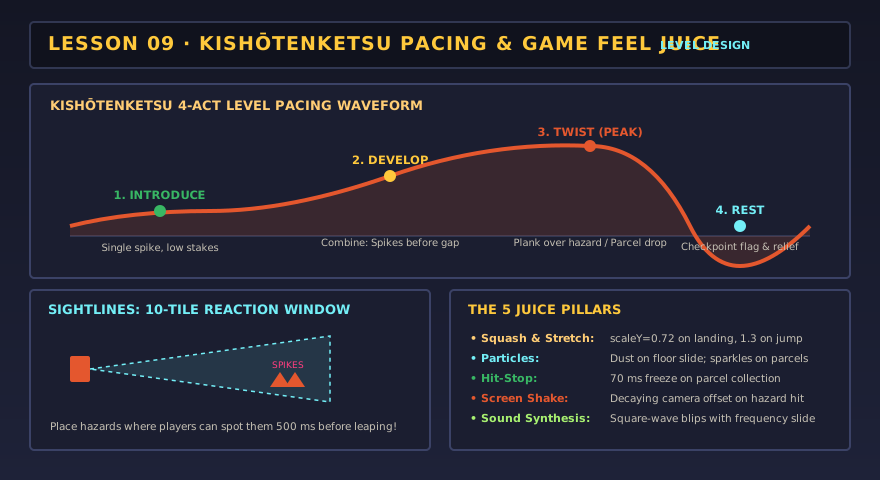
Introduce
Show a new idea where failure is cheap: a single spike on flat ground.
Lesson 09 · 70 minutes · Design layer
Great levels teach without text: introduce an idea safely, develop it, then twist it. Game feel — squash and stretch, particles, screen shake, hit-stop and sound — makes every action readable. You will redesign the level and add juice.
Where this comes from
Super Mario Bros.’ opening screen teaches running, jumping and enemies before a single word appears. Decades later, phone games like Flappy Bird and idle games like Cookie Clicker proved that juicy feedback — a pop, a number, a shake — can make even one tap satisfying. The Clicker and Rhythm tutorials are built on that feedback.
Show a new idea where failure is cheap: a single spike on flat ground.
Combine it with something known: spikes before a gap.
Change one thing: the planks over spikes, or a parcel you must drop down to reach.
After a hard part, give a checkpoint and a flat run. Tension needs release.
Level lab
Your jump height from lesson 05 sets the rules: with the starter values the courier clears about 2½ tiles up and 3 tiles across. Use the challenge chart to check pacing — screen 1 should be the easiest.
Level editor + pacing chartEverything you paint is playable below
Juice lab
Playtest your levelToggle each effect
if (justLanded) {
  p.scaleX = 1.3; p.scaleY = 0.72;   // squash…
  spawnDust(p.feet, 8);              // particles
  playSound("thud");
}
p.scaleX += (1 - p.scaleX) * 14 * dt; // …then ease back to 1
if (gotParcel) hitStop = 0.07;        // freeze 70 ms so the moment registers
if (fell) shake = 0.45; // offset the camera randomly, fading outPlaytest protocol
Definition of done
0/4 checked
Evidence: Submit your level text, your pacing chart, and the playtest notes with the change you made.
Your art and settings are already saved for the next lesson.