Lesson 07 · 70 minutes · Structure layer
Connect moments into a complete loop.
Turn one playable level into a complete game flow with a title screen, pause menu, retries, scene transitions, checkpoints, and a small persistent save file.
Game states
Name every screen and transition.
Draw arrows before coding. Each arrow needs a trigger: Start button, Escape key, last collectible, player death, or Continue button.
Autoload
Keep cross-scene data in one small manager.
Create game_state.gd, then add it through Project Settings → Globals → Autoload as GameState.
extends Node
var current_level := 1
var best_time := 999.0
var checkpoint := Vector3.ZERO

func start_game() -> void:
    current_level = 1
    get_tree().change_scene_to_file("res://levels/level_1.tscn")

func retry_level() -> void:
    get_tree().reload_current_scene()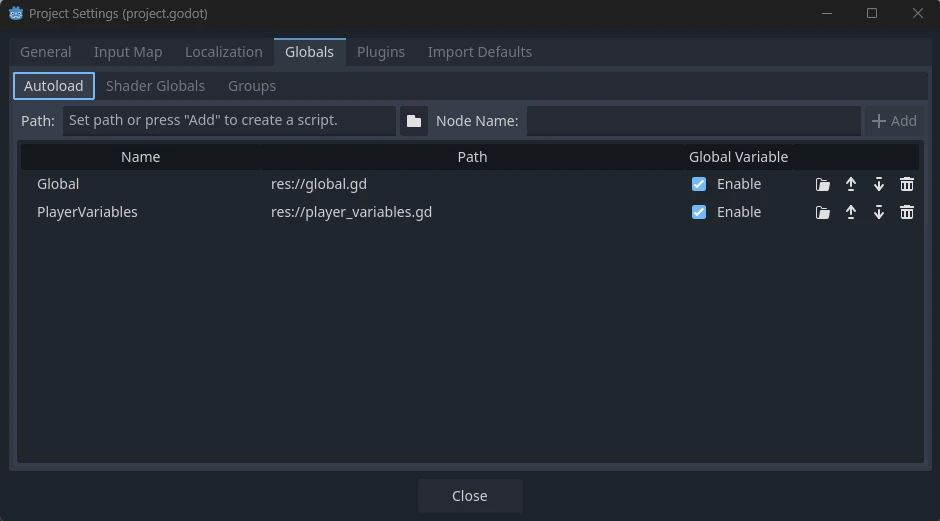
GameState), the script path, and an Enable checkbox. Add game_state.gd here and it becomes reachable from every scene.Screenshot: Godot Engine documentation, © Juan Linietsky, Ariel Manzur and the Godot community, CC BY 3.0.
Control time
Pause gameplay, not the menu.
extends Control

func _unhandled_input(event: InputEvent) -> void:
    if event.is_action_pressed("pause"):
        var paused := not get_tree().paused
        get_tree().paused = paused
        visible = paused
        Input.mouse_mode = Input.MOUSE_MODE_VISIBLE if paused else Input.MOUSE_MODE_CAPTURED
Set the pause menu’s Process Mode to Always. It must receive the pause action both before the game pauses and while it is paused so the same key can resume.
Persistence
Save only the facts you need later.
const SAVE_PATH := "user://save.json"

func save_progress() -> void:
    var data = {"level": current_level, "best_time": best_time}
    var file := FileAccess.open(SAVE_PATH, FileAccess.WRITE)
    file.store_string(JSON.stringify(data))

func load_progress() -> void:
    if not FileAccess.file_exists(SAVE_PATH): return
    var file := FileAccess.open(SAVE_PATH, FileAccess.READ)
    var data = JSON.parse_string(file.get_as_text())
    if typeof(data) != TYPE_DICTIONARY: return
    current_level = int(data.get("level", 1))
    best_time = float(data.get("best_time", 999.0))
Remix challenge
Add a reset-save button with a confirmation step. Test the experience as if a player clicks it accidentally.
Recovery
Respawn at the last activated checkpoint.
Create a Checkpoint scene with an Area3D, collision shape, visible marker, and SpawnPoint child. Connect body_entered.
extends Area3D
var activated := false

func _on_body_entered(body: Node3D) -> void:
    if activated or not body.is_in_group("player"): return
    activated = true
    GameState.checkpoint = $SpawnPoint.global_position
    $AnimationPlayer.play("activate")

# In player.gd
func respawn() -> void:
    health = max_health
    global_position = GameState.checkpoint
velocity = Vector3.ZEROSignalRun_07_GameLoop.Test title → play → checkpoint → death → respawn → pause → win → retry, then reopen the game and load the best result.Definition of done
Your game loop is complete when…
0/4 checked
Evidence: Complete the entire game-flow test without using the editor or changing code.
Lesson 7 complete
Your mechanics now form a beginning-to-end experience.