Anticipation
A flash or sound warns that an enemy will attack.
Lesson 06 · 60 minutes · Feedback layer
A working mechanic becomes satisfying when the game responds immediately. Layer motion, light, particles, sound, and camera feedback onto the events that matter most.
Feedback stack
A flash or sound warns that an enemy will attack.
Motion and sound make the collision or collection unmistakable.
The HUD changes, particles disperse, and the object leaves the scene.
Large consequences receive stronger feedback than small routine events.
Collection burst
Add GPUParticles3D, AudioStreamPlayer3D, and AnimationPlayer to EnergyCell. Turn off monitoring before the effect so it cannot be collected twice.
func collect() -> void:
    monitoring = false
    collected.emit(value)
    $Mesh.hide()
    $Particles.emitting = true
    $CollectSound.play()
    await get_tree().create_timer(0.7).timeout
    queue_free()
Do not free the node until its sound and particles have enough time to play.
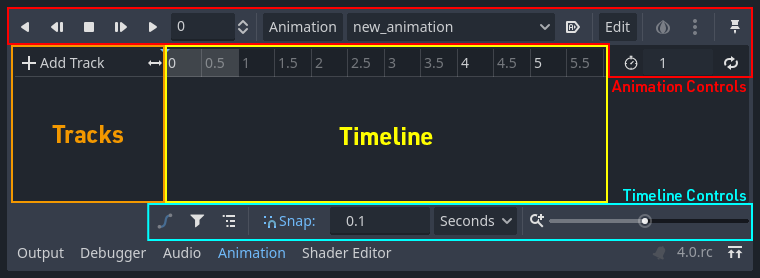
Screenshot: Godot Engine documentation, © Juan Linietsky, Ariel Manzur and the Godot community, CC BY 3.0.
Procedural animation
func punch_score() -> void:
    var tween := create_tween()
    tween.set_trans(Tween.TRANS_BACK)
    tween.tween_property($UI/ScoreLabel, "scale", Vector2(1.25, 1.25), 0.1)
tween.tween_property($UI/ScoreLabel, "scale", Vector2.ONE, 0.18)Best for authored timelines, repeated animations, and editing multiple properties visually.
Best for short code-driven transitions toward a known value.
Impact without nausea
extends Camera3D
var strength := 0.0
var rest_position: Vector3

func _ready() -> void:
    rest_position = position

func shake(amount := 0.12) -> void:
    strength = max(strength, amount)

func _process(delta: float) -> void:
    strength = move_toward(strength, 0.0, delta * 0.8)
position = rest_position + Vector3(randf_range(-strength, strength), randf_range(-strength, strength), 0)rest_position?Audio and camera
Let a classmate play once with feedback enabled and once with audio muted. Ask which events became harder to notice and record the evidence.
SignalRun_06_Feedback.Your restore point must include distinct feedback for collection, detection, damage, and winning.Definition of done
0/4 checked
Evidence: Ask a partner to name each event with the HUD hidden. If they cannot, revise the feedback.
Your systems now communicate with the player.