Install the matching export templates, create a release build, test outside the editor, fix packaging problems, and prepare Signal Run for a classroom showcase.
EXPORT PRESETRELEASE BUILDTEST PLANWEBSHOWCASE
Big ideaShipping is a test of the whole project, not just the code inside the editor.
PredictA fresh computer may reveal missing files, unclear controls, or hidden assumptions.
TestObserve a new player without coaching and record every hesitation or failure.
Why it mattersRelease thinking turns a personal prototype into a usable classroom artifact.
01 / PREP
Release candidate
Clean the project before packaging it.
0/5 checked
02 / EXPORT
Desktop build
Create a build for the target computer.
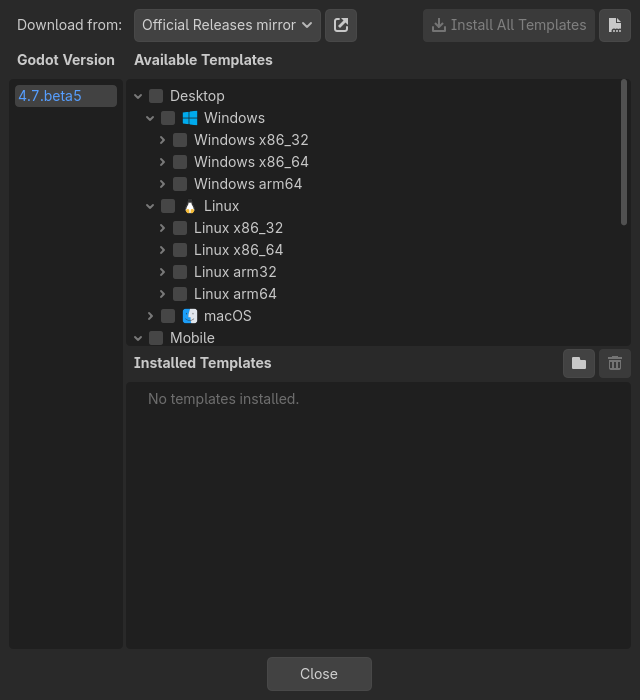
Install export templates.Open Editor → Manage Export Templates and install the version matching your editor.
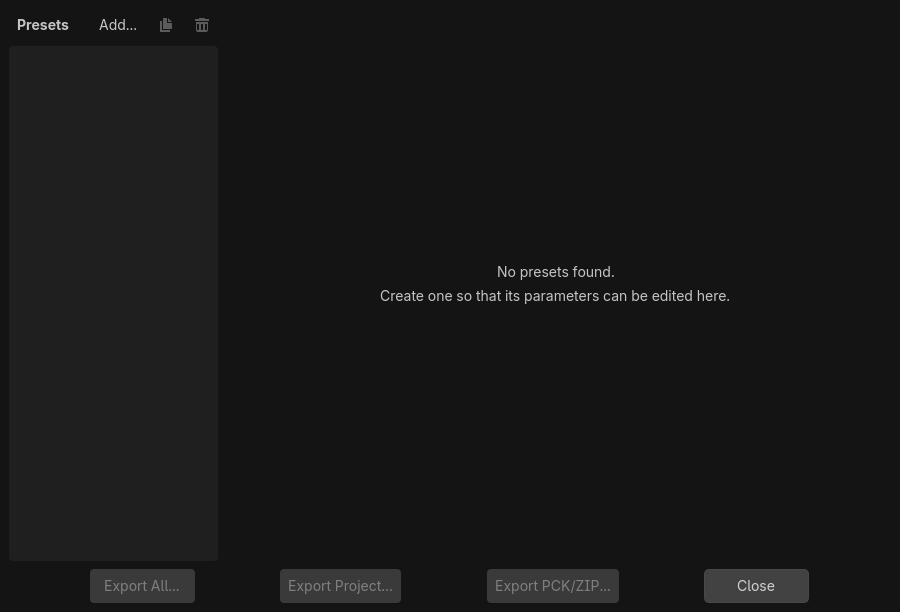
Add a preset.Open Project → Export and add Windows Desktop, macOS, Linux, or Web.
Choose a clean output folder.Use a folder such as build/windows; do not export over project source files.
Export Project.Create a release build and keep all generated companion files together.
Test outside Godot.Close the editor, launch the build, and complete the game from beginning to end.
Version match matters: Export templates must match the installed Godot editor version. A mismatch is a common reason the Export button stays unavailable.
See it in the real editor
Install templates before you export. Editor → Manage Export Templates opens this list. Each platform needs its matching version installed, or the Export button in the next step stays greyed out.Project → Export starts empty. Nothing appears here until you click Add… and choose a platform. That's the export preset step — it's normal for this window to be blank the first time you open it.
Godot 4 web exports use WebAssembly and WebGL 2. Export the main file as index.html, keep every generated file together, and serve the folder from a web server rather than opening the file directly.
Good web fit
Small GDScript project, Compatibility renderer, compressed textures, and modest audio.
Choose desktop instead
Large 3D scenes, unsupported rendering features, C# scripts, or strict performance needs.
GitHub Pages note: Export without threads unless the host is configured for the cross-origin isolation headers required by threaded web builds.
04 / TEST
Release test
Test behavior, environment, and understanding.
Smoke test
Launch, start, collect, take damage, pause, win, retry, quit.
Fresh-machine test
Run on a computer without the Godot editor or project source.
Input test
Try keyboard, mouse capture, window focus, and any supported gamepad.
Observer test
Watch someone play without coaching. Record every point of hesitation.
Bug report format
Expected: what should happen. Actual: what happened. Steps: exact actions to repeat it. Evidence: screenshot, video, or error message.
05 / SHIP
Showcase package
Help a new player begin in ten seconds.
Write a one-sentence goal: “Collect five energy cells while avoiding the patrol drone.”
Show WASD, mouse, jump, and pause controls before play.
Capture one clear screenshot that shows the player, goal, and threat.
Credit every external model, texture, font, and sound.
Include the Godot version and target platform.
Which test provides the strongest evidence that the package is complete?
Archive SignalRun_08_Release and the tested build.Keep source, export, screenshot, credits, controls, version, and test notes together.
0/4 checked
Evidence: Submit the tested build plus one observer’s notes and your final bug report.
Godot pathway complete
You designed, programmed, tested, and packaged a complete game loop.