Inventory
Shows what the player carries and how many of each item exist.
Lesson 04 · 75 minutes · Playable systems lab
Create your own pickup, load its GDScript-style properties into a live lane runner, then decide whether the item belongs in a HUD, inventory, shop, storage chest, or build recipe.
Student sandbox · changes stay in this browser
Choose a visual dimension, combine simple geometry, mold its proportions, and give the surface a material. Drag the 3D preview to inspect it.
The model is appearance. These exported values give the object an identity and tell the game what collection means.
A ← and D → move · deployed models spawn repeatedly
The runner emits one event. Each UI view listens to the same inventory data and gives it a different job.
Build it in Godot
Area3D root and match its collision mask to Player.One event, many listeners
extends Area3D
signal collected(item_id: String, value: int)
@export var item_id := "energy_cell"
@export var value := 1

func _ready() -> void:
    body_entered.connect(_on_body_entered)

func _on_body_entered(body: Node3D) -> void:
    if body.is_in_group("player"):
        collected.emit(item_id, value)
        queue_free()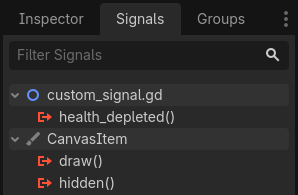
signal collected(item_id, value) line in collectible.gd makes collected appear in this same Signals tab — Godot doesn't treat custom and built-in signals differently.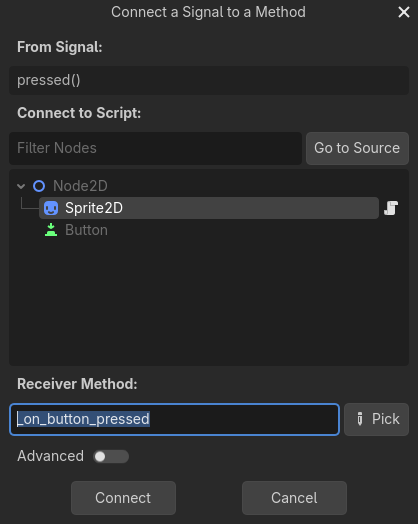
body_entered.connect(_on_body_entered) sets up from script.Screenshots: Godot Engine documentation, © Juan Linietsky, Ariel Manzur and the Godot community, CC BY 3.0.
Inventory before interface
extends Node
signal changed(items: Dictionary)
var items: Dictionary = {}

func add_item(item_id: String, amount: int = 1) -> void:
    items[item_id] = items.get(item_id, 0) + amount
    changed.emit(items)

func spend(item_id: String, amount: int) -> bool:
    if items.get(item_id, 0) < amount:
        return false
    items[item_id] -= amount
    changed.emit(items)
return trueShows what the player carries and how many of each item exist.
Checks a recipe, spends materials once, then creates an object.
Trades one resource for another and explains why a purchase is locked.
Moves quantities between two data containers without duplicating items.
Student build sprint
Collect batteries, show a three-charge meter, and spend one charge for a speed boost.
Collect scrap, display a recipe, and spend three scrap to place one barricade.
Collect coins, buy a key, and show the key in a non-stackable inventory slot.
Collect supplies, move them into a chest, and prevent negative or duplicated quantities.
SignalRun_04_Items.Your restore point must demonstrate collect → store → display → spend or transfer.Definition of done
0/4 checked
Evidence: Record a 20-second test showing the quantity rise after collection and fall after building, buying, or storing.
Your collectible now feeds a real game system.