Game Design & Development · Build a Classic
Roguelike Builder: Make Your Own Rogue
Every time you start Rogue, the computer builds you a new dungeon: new rooms, new tunnels, new monsters in new places. Nobody drew it. A few rules and one number made it, and the same number will make exactly the same dungeon again. That number is called a seed. In this lesson you build a whole roguelike in about 150 lines of JavaScript, check your dungeon generator with an algorithm, balance the fights with dice math, and design a spin-off. Our showcase game Crawlspace uses the same generator, so if you keep Crawlspace's rules, you can also walk through your dungeon in 3D.
1 · Why this game works
A roguelike is a game like Rogue (1980): you explore a dungeon on a grid, one move at a time, and when you die you start again in a brand-new dungeon. Three ideas make it work, and none of them need art.
- The dungeon is made by rules, not drawn. This is procedural generation. Rogue splits the map into a 3 × 3 grid, puts one room in each cell, and digs a tunnel between neighbouring rooms. Nine rooms, twelve tunnels, a new layout every game.
- A seed names a dungeon. Computers can't really roll dice. They use a pseudorandom number generator, a formula that turns one starting number, the seed, into a long list of numbers that look random. Same seed, same list, same dungeon. That lets you share a dungeon with a friend, or test the same one over and over.
- The world waits for you. A roguelike is turn-based. Nothing moves until you do. Then every monster gets one move. Everything stands on whole squares, so the whole game is a grid of characters and a few lists.
The program repeats one loop, once for every key you press:
…then wait for the next key. Take the stairs and the loop starts again from a new seed. Die and the run is over: that's permadeath, and it is why every run is short and every dungeon is new.
2 · The Dungeon Lab: play it, then break it
This is the finished engine. It plays by Crawlspace's rules, and everything it knows lives in the config under the game. Pick a preset and play. Click the map first, then use the arrow keys (or the buttons, on a tablet). Walk into a monster to fight it, find the > and press > to go deeper. Then change something small in the config and press Run my dungeon.
[ ], objects in { }. If something is wrong, the line under the config tells you what. "seed"names the dungeon. Any word or number works. Change one letter and the whole dungeon changes."dungeon"is the generator:"grid"(Rogue's rooms),"bsp"(rooms from cutting the map in half again and again) or"caves"(cellular automata)."cols"and"rows"are the map size, and"grid": [3, 3]is how many rooms across and down."sight"is"room"(Rogue: a room lights up when you walk in) or a number of squares you can see in every direction.- Each of the
"monsters""types"has a letter"ch","hp"(hit points),"atk"(it hits for 1 up to atk),"xp"(you get xp × 3 gold for beating it) and"minDepth", the first depth it appears on."wakeRange"is how close you get before monsters notice you. "player"sets your starting"hp","atk"and"potions", and"perLevel"is how much you grow on each new depth."goal": { "depth": 5 }means reaching depth 5 wins.0means go as deep as you can."words"and"glyphs"re-skin the game: call gold "crystals" and draw it as*.
3 · Seeds: same seed, same dungeon
A pseudorandom number generator is a recipe. Start with a number, scramble it with multiplication and bit shifts, hand out the result, then scramble that to get the next one. The numbers look random, but each one is completely decided by the one before it, all the way back to the seed. The dungeon generator asks for a number every time it needs a choice: how wide is this room? Where does it go? Which monster? So the seed decides every choice.
Change one letter, change everything
These six seeds are almost the same words, and their dungeons have nothing in common. A good generator spreads every tiny change across the whole result. Press any map to play it in the Lab.
Why every level gets its own seed
Fights use random numbers too. If depth 2 were made from the same list of numbers as depth 1's fights, then how many swings you took on depth 1 would change what depth 2 looks like, and two players with the same seed would see different dungeons. So the game mixes the run's seed with the depth number and gives each level its own seed. Minecraft does the same with chunks of its world, and the daily puzzles on our home page do it with today's date: everyone gets the same crossword because everyone's generator starts from the same day.
4 · Build the engine yourself in eight steps
The Lab has extras (three generators, line of sight, potions, goals). To understand it, first build the core: Rogue's nine rooms, tunnels, a few monsters, gold, and stairs. Make a file called rogue.html, paste the page skeleton below, then add each step inside its <script> tag in order. After every step, save, reload, and try it. Don't move on until the checkpoint works.
Step 1 · A random number generator with a seed
Math.random() gives a different number every time, and you can't make it repeat. So write your own. This one is called mulberry32: a few lines of multiplying and shifting that turn a seed into a list of numbers between 0 and 1. rnd(1, 6) uses it to roll a whole number, like a die.
rnd(1, 6) five times. Write the numbers down. Reload the page and do it again: you get the same five. Now change SEED to 7, reload, and you get a different five.Step 2 · Carve nine rooms
The map is a list of rows, and each row is a list of characters. Start with solid rock (" ") everywhere. Cut the map into a 3 × 3 grid of cells, and in each cell carve a room of floor (".") with a random size and position. Every random choice comes from rnd(), so the seed decides them all.
carveRooms(); console.log(map.map(row => row.join("")).join("\n")). You should see nine rectangles of dots in three rows.Step 3 · Dig the tunnels
Join each room to the room on its right and the room below it, centre to centre. dig() walks sideways until it lines up, then up or down, and turns any rock it passes into tunnel ("#"). That makes twelve tunnels, and every room is connected to every other room.
carveRooms(); digTunnels(); and print the map again. Tunnels of # should join every room to its neighbours. Why does dig() check for " " before writing "#"?Step 4 · Put things in the dungeon
newLevel() builds a whole level. It starts a fresh random generator from the seed and the depth, so every level is different but repeatable. The player starts in the middle of the first room, and the stairs go in the middle of the last one. Monsters and gold go on empty floor in any room except the first, so you never wake up next to a monster. Deeper levels have more monsters, and tougher kinds.
player = { x: 0, y: 0, hp: 20, atk: 3, gold: 0 }; depth = 1; newLevel(); monsters. You should see four monsters, each with a position. Run newLevel(); monsters again: the same four, in the same places.Step 5 · Draw it
Drawing is just building one long string: for every square, write the player if they are there, else a monster, else gold, else the map character. The game data and the picture are separate. Crawlspace draws exactly the same data as stone and torchlight instead.
draw(). The dungeon appears on the page with @, monster letters and $, and a status line under it.Step 6 · Your turn
One key is one turn. If the square you step toward has a monster, you attack it instead of moving: this is called bump to attack, and it means fighting needs no extra keys. If the square is floor, you move, and you pick up any gold there. If it's rock, nothing happens, and that doesn't use up a turn.
playerTurn(1, 0) a few times. The @ walks right and the turn counter goes up. Walk into a wall: "Solid rock," and the turn counter doesn't change.Step 7 · The monsters' turn
After every move of yours, each monster gets one. A monster more than 8 steps away is asleep. A monster next to you (diagonals count) attacks. Otherwise it steps toward you: diagonally if it can, else sideways, else up or down. That's the whole monster brain, and it's the same one Crawlspace uses.
Step 8 · Keys, stairs and starting again
Connect the keys. Arrow keys move, and so do Rogue's own letters: h j k l, with y u b n for diagonals. They were the arrow keys printed on the terminals Rogue was written on. > on the stairs makes the next level and makes you a little stronger.
SEED and reload for a new one. Then try a monster that hits harder, or a fourth kind.Show the complete program
Your dungeon is a grid of tile data, walls are solid, and monsters are spawned while the game runs. Every engine has those same three ideas:
5 · Inside Crawlspace: the same engine in stone
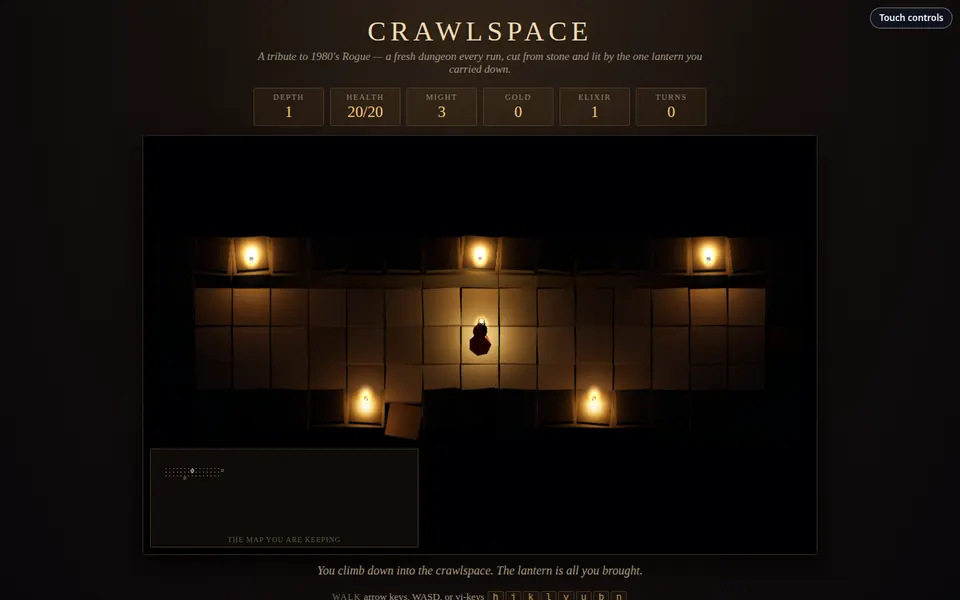
Crawlspace is a roguelike in our showcase. It looks nothing like your rogue.html: every stone, flame and creature is a 3D model built from simple shapes when the page loads. But its game is the one you just wrote, and since this lesson it gets its dungeons from the same generator file as the Lab: assets/js/rogue-dungeon.js. Here is where it asks for a level:
function generateLevel() {
  const level = RogueDungeon.generate(RULES, seed, depth);
  tiles = level.tiles;
  rooms = level.rooms;
  monsters = level.monsters;
  items = level.items;
So a seed is a real name for a dungeon in both games. Play the Crawlspace preset in the Lab, press Walk it in Crawlspace, and you arrive in the same rooms with the monsters in the same places. Only the fights differ: Crawlspace rolls fresh dice in each fight.
Find your code in Crawlspace
Every rule from steps 6 and 7 is in Crawlspace's script.js, almost word for word. These lines are copied straight from it:
| Rogue's rule | In Crawlspace's code | In your rogue.html |
|---|---|---|
| Bump to attack | const target = monsterAt(nx, ny);
if (target) {
const dmg = rnd(1, player.atk);
target.hp -= dmg; | Step 6, if (m) { … } |
| Walls cost no turn | if (!isWalkable(nx, ny)) {
message = "You bump into cold stone.";
return; // doesn't cost a turn
} | Step 6, return draw(); |
| Far monsters sleep | if (dist > 9) continue; // asleep / out of range, like Rogue's wandering monsters | Step 7, if (away > 8 …) continue; |
The rule that makes the 3D possible
Halfway down Crawlspace's code there is a line every game programmer should know:
 * Nothing past this line writes to the simulation. It reads the same tiles,
 * monsters, items and player the loop above owns, and rebuilds its own scene
 * when it notices those have been replaced.
The top half is the simulation: the grid, the turn loop, the dice. The bottom half is the renderer: it only reads the simulation and draws it. Because the two are kept apart, the same game can be drawn as characters (your Lab, and Crawlspace's parchment map) or as stone (Crawlspace's 3D view) without changing a single rule. The renderer even keeps its own copy of where each model is, so creatures can glide between squares while the game still thinks in whole squares:
// Rendered positions, kept apart from logical ones so models walk between
// cells instead of teleporting. The simulation never reads any of this.
Rogue's lighting survives too. Rogue remembered which squares you had seen and which you can see now. Your Lab draws remembered squares dim. Crawlspace paints the same two states onto the stone: lit by flame if you can see it now, cold and blue if you only remember it.
6 · Check your generator with flood fill
A generator makes thousands of dungeons, and you can only play a few. What if seed 4,107 puts the stairs somewhere you can't reach? Nobody would find out until a player got stuck. So programmers write a checker: a program that builds hundreds of dungeons and tests each one. The test is a flood fill, the same idea as the paint-bucket tool. Start at the player, and spread to every square you can walk to, one step at a time. Any floor the flood never reaches is cut off.
If you count the steps as the flood spreads, you get a distance map: every square holds its number of steps from the start. That is breadth-first search, with a queue (a list where you add at the back and take from the front):
function distanceMap(start) {
  const dist = map.map(row => row.map(() => -1));   // -1 means "not reached yet"
  dist[start.y][start.x] = 0;
  const queue = [start];
  while (queue.length) {
    const here = queue.shift();                      // take from the front
    for (let dy = -1; dy <= 1; dy++) {
      for (let dx = -1; dx <= 1; dx++) {
        const x = here.x + dx, y = here.y + dy;
        if (walkable(x, y) && dist[y][x] === -1) {
          dist[y][x] = dist[here.y][here.x] + 1;
          queue.push({ x: x, y: y });                // add to the back
        }
      }
    }
  }
  return dist;   // if dist[stairs.y][stairs.x] is -1, the stairs can't be reached
}
Turn on Distance map under the Lab game to watch it: blue squares are near you and red ones are far away. The generator uses the same map to put the stairs in the room farthest from the start (the "farthest" option), so every level makes you cross it. Monsters can use it too: a monster that always steps to a square with a smaller number will find you around any corner.
Why caves need the flood fill
Rogue's grid can't fail: the tunnels join every room to its neighbours. Caves are different. The cellular automaton starts with random rock (about 45%), then smooths it four times with one rule: a square becomes rock if 5 or more of the 9 squares around it (including itself) are rock. The noise settles into smooth caverns, but some are sealed off. The fix is two lines of thinking: flood fill every cave, keep only the biggest, and fill the others with rock. Then put the stairs at the far end of the distance map. The broken example skips both fixes. Check it and count the dungeons a player could never finish.
Our generator also splits maps with binary space partitioning ("bsp"): cut the map in two, cut each half in two, and keep going until the pieces are small. One room goes in each piece, and a tunnel joins the two halves of every cut, so it is always connected, like Rogue's grid.
7 · Balance the fights with dice math
A hit does rnd(1, atk) damage: any whole number from 1 to atk, all equally likely. The average of 1, 2 and 3 is 2. The average of 1 to 5 is 3. In general, the average hit, the expected value, is (1 + atk) ÷ 2. That one formula is enough to balance a roguelike:
- Swings to win ≈ monster hp ÷ your average hit. A troll (16 hp) against attack 3 (average 2) takes about 8 swings.
- Damage you take ≈ (swings − 1) × its average hit. You swing first, so the monster gets one fewer turn. The troll hits for 3 on average, so about 7 × 3 = 21. That's more than your 20 hp at the start, which is why trolls only appear from depth 5.
Averages hide bad luck, though. To see the luck, run a Monte Carlo simulation: let the computer play the same fight 10,000 times and count what happens. The calculator below reads the monsters and player from the Lab config, so if you change a monster there, its numbers change here.
Things to notice: an average can be safe while one fight in twenty goes badly, and that is where the elixirs matter. And the player grows on every level while the monsters don't, so each monster has a depth where it stops being scary. A good minDepth makes each monster arrive just before that.
8 · Design your spin-off
A good spin-off keeps the structure (a seeded generator, turns, bump to attack, stairs, permadeath) and changes the world: its generator, its monsters, its words and its goal. The Lab's presets are spin-offs of Crawlspace. Fill in the last column.
| Part of the game | Crawlspace | Sunken Library | Crystal Caves | Bug Hunt | Your spin-off |
|---|---|---|---|---|---|
| The world | A dungeon under the house | A library sinking into a lake | Caves full of glowing crystals | The inside of an infected computer | ? |
| Generator | grid 3 × 3 | bsp | caves | grid 4 × 3 | ? |
| Sight | The room you're in | The room you're in | 7 squares | The room you're in | ? |
| Weakest / toughest | rat r / troll T | bookworm w / dust golem G | cave bat b / cave troll T | bug b / worm W | ? |
| Treasure | gold $ | pages ? | crystals * | data $ | ? |
| Goal | None: go as deep as you dare | Reach depth 5 | Reach depth 6 | Reach depth 4 | ? |
Not sure where to start? Roll the idea dice.
Twists that change the rules, not just the words
- A hunger clock: food runs down every turn. Now exploring costs something, and you can't wait in a corner forever.
- A daily dungeon: make the seed from today's date, so the whole class plays the same dungeon and compares scores.
- Monsters that don't fight: a thief that steals gold and runs, or a slime that splits in two when hit.
- A light that shrinks: your sight radius goes down by one every 50 turns until you find oil.
- Pacifist run: no attacking at all. Sneak past, and score points for the monsters you never woke.
- Mixed generators: grid on depths 1 to 3, caves below, so the dungeon changes as you go deeper.
Design sheet
When the sheet is done, put it in the Lab config, run the generator checker until it finds nothing wrong, and test every monster in the fight calculator.
9 · Art guide: what you need to draw
Rogue shipped with no art at all, and it is still played. So make the game work in characters first. When you add art, draw tiles: small squares that each stand for one character. Make a list before you open a drawing tool. Draw every Must first (the game can ship with only those), then Should, then Bonus.
Floor, tunnel, wall Must
3 tiles · . # and rock. Keep them quiet and dark so everything standing on them stands out.
Stairs Must
1 tile · The most important square on every level. Make it the brightest thing on the floor.
The player Must
1 tile · Readable at a glance in a crowd. One colour no monster uses.
Monsters Must
1 per monster type · Make tougher monsters look bigger or brighter, so players can judge danger before they fight.
Treasure and potions Must
2 tiles · Gold and elixir. Warm colours that say "pick me up".
Floor variants Should
2 to 4 per floor tile · Cracks and moss, picked at random from the square's position (like Crawlspace's stones), so big rooms don't look like wallpaper.
HUD icons Should
5 icons · Health, attack, gold, potions, depth. Small, so keep the shapes simple.
Title and game-over screens Bonus
2 pictures · The game-over screen shows the seed, so players can try the same dungeon again.
How many tiles is your game?
- One size, one grid. Every tile is the same size (16 × 16 or 32 × 32), because the game is a grid. Draw on a canvas that size, never bigger and shrunk down.
- Pick a palette first. Five to eight colours, written down as hex codes. Crawlspace's parchment map uses only seven, and the Lab copies them.
- Shape before colour. Some players can't tell red from green. A monster should be recognisable by its outline (or its letter) alone.
- Remembered squares look different. Plan a dim version of each floor tile for places the player has seen but can't see now, or draw the remembered map with a dark overlay.
- Only your own art. If you use something you didn't make, write down who made it and the license.
Swap characters for tiles without touching the rules: keep a table from character to picture, like const TILES = { "#": "art/tunnel.png", "r": "art/rat.png" }, and draw TILES[ch] on a <canvas> at x * 32, y * 32. The ASCII Art & Rogue lesson has a demo that switches between characters and tiles. Where to draw: Pixel Art & Sprites, Tilesets & Tilemaps, or Web Studio Draw mode.
10 · Challenges
Pick one or two for your rogue.html. They get harder as you go down the list.
- A daily dungeon. Make
SEEDfrom today's date, like20261026, and show it on screen. Everyone in the class plays the same dungeon today. Who gets deepest? - Potions. Add
!items that heal 6 to 12 when you press q. Count how many you carry in the status line. - Rogue's lighting. Keep a
seengrid of true and false. Only draw squares in the room you're standing in (and the eight around you in a tunnel), plus squares you've seen before. Draw remembered squares in a dimmer colour by putting them in a<span>. - A morgue file. Roguelike players call the record of a dead character a morgue file. When you die, save the seed, depth, gold and what killed you to
localStorage, and show the five best runs. The Menus, Saving & Shipping lesson explains how. - Smarter monsters. Use the distance map from section 6, starting from the player. Each monster steps to the neighbouring square with the smallest number, so it follows you around corners instead of getting stuck on walls.
- A new generator. Write
carveCaves()with the cellular automaton from section 6, then flood fill to keep the biggest cave. Check it with your owndistanceMap()on 100 seeds before you play it.
11 · Where it came from, and designing with care
In 1980, Michael Toy and Glenn Wichman, students at UC Santa Cruz, wanted an adventure game that would be different every time, even for its own authors. Their terminals could only show text, so they used Ken Arnold's curses library to put characters anywhere on the screen, and built Rogue. It spread on university computers, and its descendants are still being made. In 2008, developers at a roguelike conference in Berlin wrote down what makes a game "roguelike" (the Berlin Interpretation): random dungeons, permadeath, turns, a grid, and making the most of what you find.
- Michael Toy and Glenn Wichman make Rogue at UC Santa Cruz. Each game builds a new dungeon from a 3 × 3 grid of rooms.
- Jay Fenlason and his friends, students at Lincoln-Sudbury Regional High School in Massachusetts, write Hack, inspired by Rogue.
- Robert Koeneke writes Moria at the University of Oklahoma: one huge dungeon, inspired by Tolkien.
- Hack grows into NetHack, written by volunteers over the early internet. It is still being updated today.
- Moria grows into Angband, with a dungeon a hundred levels deep.
- Developers at a roguelike conference in Berlin list what makes a game roguelike: random levels, permadeath, turns, a grid.
- Derek Yu's Spelunky puts Rogue's generated levels and permadeath into a platformer, and "roguelite" games take off.
- Spin-offs go everywhere: FTL: Faster Than Light makes the dungeon a spaceship's journey through generated star systems.
- Our showcase gets Crawlspace: Rogue's 3 × 3 rooms, rebuilt in stone and lit by one lantern.
Random games can be unfair in ways a hand-made level can't. When you design yours:
- Every seed must be winnable. A player who dies to bad luck tries again. A player whose stairs are sealed in rock stops playing. That's why the checker in section 6 exists: run it on hundreds of seeds, not just the one you tested.
- Let players see danger coming. Monsters should be visible before they can hit you, and tougher monsters should look tougher. Death should feel like "I should have drunk the elixir," not "what was that?"
- Be kind about permadeath. Keep runs short, show what killed the player and the seed, and offer "same seed again", so losing teaches something.
- Never sell randomness. Random loot is fun when it's earned by playing. Paying real money for a random chance at a prize is gambling, and games aimed at young people shouldn't do it.
- Respectful monsters. Rats, slimes and dust golems are fine. Don't make real people or real groups of people into monsters.
- Play without colour. Many players can't tell some colours apart. If your game is still playable in black and white, it is playable for them too.
12 · Show what you built
Hand in your rogue.html (or the file from the Lab), your design sheet, and a screenshot of the generator checker's report. Your teacher will look for:
| Criterion | Meets the goal when… |
|---|---|
| It works | You can play from depth 1 down several levels and die or win without errors. |
| Seeded | The same seed always builds the same dungeon, and changing the seed builds a different one. You can explain why each level has its own seed. |
| Turn-based | Monsters move only after the player does, walls cost no turn, and walking into a monster attacks it. |
| Checked | The checker (or your own flood fill) shows the stairs can be reached on at least 100 seeds. |
| Balanced | Every monster's numbers are explained with expected value or the fight calculator, and each one appears at a sensible depth. |
| Fair and careful | Dangers are visible, the game-over screen shows the seed, and the monsters treat real people with respect. |
Next: walk your dungeon in Crawlspace, see how Rogue drew with characters in ASCII Art & Rogue, grow natural-looking terrain in Perlin Noise, make monsters plan routes with Rescue Grid: The A* Mission, or build the other classics: Trail Game Builder, Lemonade Tycoon Builder and Text Adventure Builder.